Welcome to my tech blog

This blog serves mainly as an extension of my brains memory. I try to compile all sorts stuff that proved to be helpful to me and probably will be to others. Be warned, the posts I write might not make ANY sense to you if you are not familiar with IT matters.


IronPort ESA LDAP Accept Query – Disabled AD Accounts

I recently had the possibility to work on a project where I had to setup and implement an E-Mail gateway using Cisco IronPort Email Security Appliances (ESA) and stumbled over an interesting issue.

If you verify the recipient on incoming mails via an internal ActiveDirectory (only accept mails for people who have a E-Mail address associated to their account in ActiveDirectory), you might find this useful:

To avoid the ESAs from accepting mail for disabled accounts, you have to use a custom accept-query:


(&(|(mail={a})(proxyAddresses=smtp:{a}))(!(userAccountControl:1.2.840.113556.1.4.803:=2)))

This query takes into account, that the ActiveDirectory marks disabled accounts by setting the userAccountControl flag to 0×0002 (decimal 2).

As a comparison, this is the default accept-query:


(|(mail={a})(proxyAddresses=smtp:{a}))

Links
http://support.microsoft.com/kb/305144
http://msdn.microsoft.com/en-us/library/windows/desktop/ms680832%28v=vs.85%29.aspx

Posted in Sysadmin | Tagged , , , , , | Leave a comment

Sending Zabbix Alert SMS via USB modem

During some Zabbix sessions, I thought it would be nice to be able to alert via SMS. Zabbix, out of the box, supports the possibility to send SMS via attached GSM modems, so I gave it a try. I am currently using a Huawei USB modem:


Bus 003 Device 011: ID 12d1:1003 Huawei Technologies Co., Ltd. E220 HSDPA Modem / E230/E270/E870 HSDPA/HSUPA Modem

Unfortunately, this modem has some troubles with the AT command sequences Zabbix sends:
/var/log/zabbix-server/zabbix_server.log


   856:20120120:170920.965 Read from GSM modem [^MOK^M]
   856:20120120:170920.965 End of read_gsm():SUCCEED
   856:20120120:170920.965 Write to GSM modem [ATE0^M]
   856:20120120:170920.965 In read_gsm() [OK] [NULL] [NULL] [NULL]
   856:20120120:170921.069 Read from GSM modem [^MOK^M]
   856:20120120:170921.069 In check_modem_result()
   856:20120120:170921.069 End of check_modem_result():SUCCEED
   856:20120120:170921.069 End of read_gsm():SUCCEED
   856:20120120:170921.069 Write to GSM modem [AT^M]
   856:20120120:170921.069 In read_gsm() [OK] [NULL] [NULL] [NULL]
   856:20120120:170921.173 Read from GSM modem [^MOK^M]
   856:20120120:170921.174 In check_modem_result()
   856:20120120:170921.174 End of check_modem_result():SUCCEED
   856:20120120:170921.174 End of read_gsm():SUCCEED
   856:20120120:170921.174 Write to GSM modem [AT+CMGF=1^M]
   856:20120120:170921.174 In read_gsm() [OK] [NULL] [NULL] [NULL]
   856:20120120:170921.277 Read from GSM modem [^MOK^M]
   856:20120120:170921.277 In check_modem_result()
   856:20120120:170921.277 End of check_modem_result():SUCCEED
   856:20120120:170921.277 End of read_gsm():SUCCEED
   856:20120120:170921.277 Write to GSM modem [AT+CMGS="]
   856:20120120:170921.277 Write to GSM modem [0041791234567]
   856:20120120:170921.277 Write to GSM modem ["^M]
   856:20120120:170921.277 In read_gsm() [> ] [NULL] [NULL] [NULL]
   856:20120120:170921.385 Read from GSM modem [^M> ]
   856:20120120:170921.385 In check_modem_result()
   856:20120120:170921.385 End of check_modem_result():SUCCEED
   856:20120120:170921.385 End of read_gsm():SUCCEED
   856:20120120:170921.385 Write to GSM modem [Host xyz is unreachable: PROBLEM]
   856:20120120:170921.385 Write to GSM modem [^Z]
   856:20120120:170921.385 In read_gsm() [+CMGS: ] [NULL] [NULL] [NULL]
   856:20120120:170921.489 Read from GSM modem [^M]
   856:20120120:170921.489 In check_modem_result()
   856:20120120:170921.489 End of check_modem_result():FAIL
   856:20120120:170921.489 End of read_gsm():FAIL
   856:20120120:170921.489 Write to GSM modem [^MESC^Z]
   856:20120120:170921.489 In read_gsm() [] [NULL] [NULL] [NULL]
   856:20120120:170921.489 Error during wait for GSM modem.
   856:20120120:170921.489 Read from GSM modem []
   856:20120120:170921.489 End of read_gsm():SUCCEED
   856:20120120:170921.494 End of send_sms():FAIL
   856:20120120:170921.494 End execute_action()
   856:20120120:170921.494 Error sending alert ID [62]

After some research I figured out that it probably would be a better idea to write a wrapper-script to implement the SMS functionality. There is actually a way to fix this AT command sequence issue, but it would require recompiling some parts of Zabbix (which is not an option for me, as I use the Debian packaged Zabbix). To interface with the modem, I am finally using Gnokii:

/etc/zabbix/gnokii.conf


[global]
port = /dev/ttyUSB1
model = AT
connection = serial

Thats the script I use to send the alerts to (taken straight from zabbix.com):

/etc/zabbix/alert.d/zabbix-sms.sh


#!/bin/sh
LOGFILE="/var/log/zabbix-server/zabbix-sms.log"
echo "To: '$1' Text: '$3'" >> ${LOGFILE}
PHONENR=`echo "$1" | sed s#\s##`
/bin/echo "$3" | /usr/bin/gnokii --config /etc/zabbix/gnokii.conf --sendsms "${PHONENR}" 1>>${LOGFILE} 2>&1

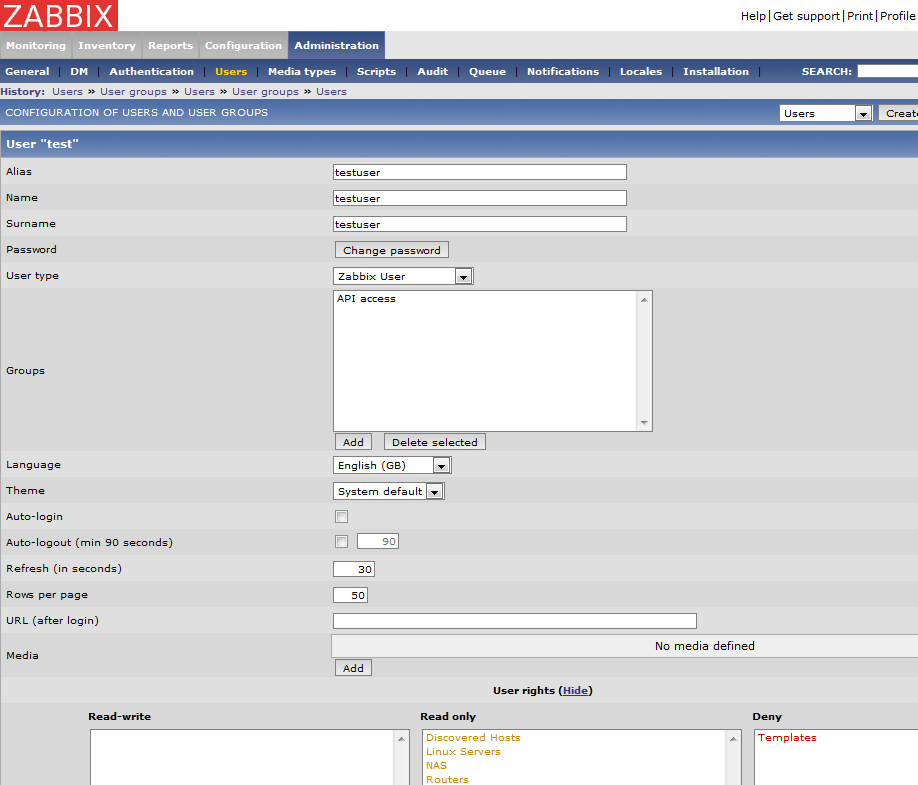
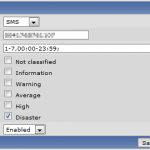
Here are some screenshots on how to configure the SMS alert in the Zabbix GUI:

Links
http://www.zabbix.com/wiki/howto/config/alerts/sms
http://lab4.org/wiki/Zabbix_Medien_einrichten

Posted in Sysadmin | Tagged , , , | Leave a comment

Mounting LVM nested Partitons

With this post, I want to describe how you can mount partitions, nested within LVM volumes. A possible use-case includes file based backup of virtual machines running on LVM volumes.

In the example below, I use a Windows Server 2008 system partition (NTFS). The Windows server is running on a Debian KVM system.

You will need:

  • kpartx
  • (In this exampe also ntfs-3g)

Lets get started – first some information about the LVM setup:


root@SERVER:/# lvdisplay
  --- Logical volume ---
  LV Name                /dev/lvm/windoze2k8
  VG Name                lvm
  LV UUID                836UYu-lmuT-qCUg-2lRx-QNgZ-COf7-h6NUH6
  LV Write Access        read/write
  LV Status              available
  # open                 0
  LV Size                19.53 GiB
  Current LE             5000
  Segments               1
  Allocation             inherit
  Read ahead sectors     auto
  - currently set to     256
  Block device           254:1

The partition table of our LVM volume:


root@SERVER:/# fdisk -l /dev/lvm/windoze2k8

Disk /dev/lvm/windoze2k8: 21.0 GB, 20971520000 bytes
255 heads, 63 sectors/track, 2549 cylinders
Units = cylinders of 16065 * 512 = 8225280 bytes
Sector size (logical/physical): 512 bytes / 512 bytes
I/O size (minimum/optimal): 512 bytes / 512 bytes
Disk identifier: 0x1a13ce21

                       Device Boot      Start         End      Blocks   Id  System
/dev/lvm/windoze2k81   *           1        2550    20477952    7  HPFS/NTFS

Now, lets move on to the the actual doing:


root@SERVER:~# kpartx -a /dev/lvm/windoze2k8
root@SERVER:~# mkdir /mnt/lvm-windoze2k81 && mount /dev/mapper/lvm-windoze2k81 /mnt/lvm-windoze2k81

Et voila:


root@SERVER:~# ls /mnt/lvm-windoze2k81
autoexec.bat  bootmgr       config.sys              hiberfil.sys  PerfLogs     Program Files  System Volume Information  Windows
Boot          BOOTSECT.BAK  Documents and Settings  pagefile.sys  ProgramData  $RECYCLE.BIN   Users

To remove the mapping, do the following:


root@SERVER:/# umount /mnt/lvm-windoze2k81
root@SERVER:/# kpartx -d /dev/lvm/windoze2k8

Note
If you want to use such a setup to do file based backup of running virtual machines, it is wise to create a LVM snapshot first and applying kpartx on the snapshot device.

Posted in Sysadmin | Tagged , , | 1 Comment

Windows Eventlogs to Syslog

Because central logging is so awesome and widely used in the Linux/Unix world, I want to show you a way how you can also gather Windows Event Logs through the good old Syslog Server.

  • On the server side, its quite simple: Use the plain vanilla Syslog or use something with Syslog capabilities (e.g. Rsyslog or even better Splunk).
  • On your Windows System, get eventlog-to-syslog (http://code.google.com/p/eventlog-to-syslog), put the two program files in C:\Windows\System32 and install it as a service as described below:
    
    C:\Users\administrator>evtsys -i -h <SYSLOGHOST>
    Checking ignore file...
    Aug 23 20:27:25 HOSTNAME Error opening file: evtsys.cfg: The system cannot find
    the file specified.
    
    Aug 23 20:27:25 HOSTNAME Creating file with filename: evtsys.cfg
    Command completed successfully
    
    C:\Users\administrator>net start evtsys
    The Eventlog to Syslog service is starting.
    The Eventlog to Syslog service was started successfully.
    

Here are the options for eventlog-to-syslog:


Version: 4.4 (32-bit)
Usage: evtsys -i|-u|-d [-h host] [-b host] [-f facility] [-p port]
       [-t tag] [-s minutes] [-l level] [-n]
  -i           Install service
  -u           Uninstall service
  -d           Debug: run as console program
  -h host      Name of log host
  -b host      Name of secondary log host
  -f facility  Facility level of syslog message
  -l level     Minimum level to send to syslog.
               0=All/Verbose, 1=Critical, 2=Error, 3=Warning, 4=Info
  -n           Include only those events specified in the config file.
  -p port      Port number of syslogd
  -q bool      Query the Dhcp server to obtain the syslog/port to log to
               (0/1 = disable/enable)
  -t tag       Include tag as program field in syslog message.
  -s minutes   Optional interval between status messages. 0 = Disabled

Default port: 514
Default facility: daemon
Default status interval: 0
Host (-h) required if installing.
Posted in Sysadmin | Tagged , , | Leave a comment

List based permanent bans with fail2ban

Today I post something about the nice little tool fail2ban. As you probably know, fail2ban can be used to block those annoying brute force attacks against your servers. Other than the also popular and useful tool DenyHosts it allows the protection of other services than SSH as well (e.g. HTML login pages served by Apache). The working mechanism also differs from that of DenyHosts, as fail2ban uses iptables instead of the BSD style hosts.deny file to block annoying brute forcers. Installation is quite simple, on Debian for example, just install it through apt and you’re good to go even with the default config.

One thing that I was missing, was the option to ban IPs forever. You can basically do this by setting bantime to a negative value, but as soon as you reload your iptables rules (e.g. by restarting the fail2ban service or the whole system) the entries for the permanently banned IPs are gone.
To overcome this issue, I did some minor changes to the actions fail2ban executes on start-up and on banning.

IMPORTANT: I strongly advise you, to be careful while playing around with automated banning tools, especially if you can’t reach your server physically. Make sure, that you have something useful set in the ignoreip option under the [DEFAULT] jail (your current IP address) to not accidentally lock you out of the system (really nasty with permanent banning active…)

  1. First, check the banaction currently used (you need that, to modify the correct actionfile afterwards)
    /etc/fail2ban/jail.local

    
    #
    # ACTIONS
    #
    ...
    banaction = iptables-multiport
    ...
    
  2. Open up the corresponding actionfile and modify according to the sample below (changes are under the # Persistent banning of IPs comment)
    /etc/fail2ban/action.d/iptables-multiport.conf

    
    ...
    actionstart = iptables -N fail2ban-<name>
                  iptables -A fail2ban-<name> -j RETURN
                  iptables -I INPUT -p <protocol> -m multiport --dports <port> -j fail2ban-<name>
                  # Persistent banning of IPs
                  cat /etc/fail2ban/ip.blacklist | while read IP; do iptables -I fail2ban-<name> 1 -s $IP -j DROP; done
    ...
    actionban = iptables -I fail2ban-<name> 1 -s <ip> -j DROP
                # Persistent banning of IPs
                echo '<ip>' >> /etc/fail2ban/ip.blacklist
    ...
    
  3. Your blacklist should look something like this (one IP per line, of course you can add IPs manually)
    /etc/fail2ban/ip.blacklist

    
    ...
    10.0.0.242
    192.168.1.39
    ...
    
  4. Restart fail2ban to make the changes active

Now, what happens is that each time fail2ban starts, it loops through your ip.blacklist and blocks the IPs in there. If fail2ban blocks a new IP, it will automatically append it to the blacklist.

Links
http://www.fail2ban.org
http://www.fail2ban.org/wiki/index.php/Whitelist
http://denyhosts.sourceforge.net

Posted in Sysadmin | Tagged , , , , | 7 Comments

Backing up a MySQL server

Just wanted to paste a small script here, which dumps and gzips all databases hosted on a MySQL instance.
Make sure, that this script is not readable for everybody, as it contains credentials.

dumpdbs.sh


#!/bin/bash
#
# MySQL database dump
#
# - Takes MySQL Dumps of all available databases
# - Only keeps one backup in the dumpfolder
# -> uncomment the LOG variable and the pipes to the tee command for logging to a file
#
# 2011, Looke
#

# Setup
DBUSER=root
DBPASS=xxx
DBDUMPDIR=/dbdumps
DBDUMPDATE=$(date '+%d-%m-%Y')
# LOG=/var/log/dumpdbs

# Create/Empty DBDUMPDIR
if [ ! -d $DBDUMPDIR ]; then
	echo $(date +"%d/%m/%Y %T") INFO: $DBDUMPDIR not found, will create it... #| tee -a $LOG
	mkdir $DBDUMPDIR
else
	echo $(date +"%d/%m/%Y %T") INFO: Emptying $DBDUMPDIR... #| tee -a $LOG
	rm -f $DBDUMPDIR/*
fi

# Loop through all databases available and dump them (gzipped)
for DBNAME in $(echo "show databases;" | mysql --user=$DBUSER --password=$DBPASS -s)
do
	echo $(date +"%d/%m/%Y %T") INFO: Dumping $DBNAME as ${DBNAME}_${DBDUMPDATE}.sql.gz... # | tee -a $LOG
	mysqldump --user=$DBUSER --password=$DBPASS $DBNAME | gzip -c > $DBDUMPDIR/${DBNAME}_${DBDUMPDATE}.sql.gz
done

This script does a good job together with Bacula. Here the Job resource in Bacula


Job {
  Name = "Backup MySQL DBs"
  ...
  Client Run Before Job = "/opt/bacula/scripts/dumpdbs.sh"
  ...
}
Posted in Sysadmin | Tagged , , | Leave a comment

Deploying the pfSense firewall system on ALIX hardware

Recently, while fiddling around with my home network I got really tired of my old Netgear Wifi router and its limited functionality. After I found out that the revision I have doesn’t allow to run any custom firmware (dd-wrt or tomato), I decided to look out for something more open (and fun). I already used IPCop and so I started from there, thinking about building up a small computer to run IPCop. But having to dedicate a computer only for use as a home router/firewall sucks a bit… So after some further web research i bumped into the ALIX boards. Basically, they’re fully featured PCs on a single board allowing to hook up a CF card and to run a OS from there. Many people are successfully running the open source FreeBSD based firewall distro pfSense (an offspring of the m0n0wall firewall distro, which btw. also runs on ALIX systems) on it, so I decided to give it a shot. I placed an order for the required hardware on www.pcengines.ch (see “My system”) and after two days everything arrived. Building the system was good fun and after 15 minutes, everything was up and running.

My system

  • 1x ALIX.2D2 system board
  • 1x Enclosure 2 LAN, black, USB
  • 1x AC adapter 18V
  • 2x Cable I-PEX -> reverse SMA
  • 2x Antenna reverse SMA
  • 1x Compex WLM54SAG23 miniPCI card
  • 1x SanDisk ULTRA Compact Flash 4 GB

Here you can see some building steps and a screenshot of the pfSense dashboard.

Before you install anything, make sure your board has a up-to date BIOS installed. To do so, connect the ALIX to your computer using a nullmodem cable (with Serial to USB if needed). I used minocom on my ubuntu machine, using the settings 38400 8N1, without flow control. The most current BIOS as I’m writing this article is 0.99h. If you have an older version installed, you should upgrade it (check the ALIX manual).

PC Engines ALIX.2 v0.99h
640 KB Base Memory
261120 KB Extended Memory 

Installing pfSense is quite simple. Fetch the suitable image (which fits your CF card size) and flash it

Flashing the image to the CF card
I would recommend you to use a USB CF cardreader. Make sure, the CF is not mounted and get the correct device name of it. Flash the image with the following command:


zcat pfSense-2.0-RC1-4g-i386-20110226-1633-nanobsd.img.gz | dd of=/dev/sdX bs=16k

pfSense allows to read out several parameters via SNMP

Reading the system uptime via SNMP


snmpget -c public -v 2c -O qv 10.0.0.1 HOST-RESOURCES-MIB::hrSystemUptime.0

Links
http://www.pcengines.ch
http://pfsense.org
http://m0n0.ch/wall/

Posted in Networks | Tagged , , , | Leave a comment

ActiveDirectory – Connectivity through NAT

Even though, ActiveDirectory communication through a NATed (and port-forwarded) interface is not officially supported by MS, there is a way to do that. I stumbled upon this issue, after forgetting it for quite some time (solved it with a nasty hack in the first place – keyword: read only DNS entries)

Situation:


 [DC1]------------>[NATed interface]------------>[DC2]<--------[Clients]

  • DC1 addresses DC2 by the address of the NAT interface
  • CLIENTS address DC2 by its real address

Problem
DC2 updates its DNS record with its current IP address (real address)
DC1 can't reach DC2 through its real IP, instead it would need the address of the NAT interface.

Solution
Add the following Registry Key on DC2 to force it to add its real and his NATed IP to its Host DNS records

HKLM\SYSTEM\CurrentControlSet\Services\DNS\Parameters
Registry Value: PublishAddresses
Registry Value Type: REG_SZ
Registry Value Data: sepparated by single whitespace

The nice thing is, that the DNS server serves the address of DC2 that is suitable for the host. If the host is on the same network as DC2 it gets its real IP, if its on the other side of the NATed interface it gets the NAT interfaces address.

More infos
DNS PublishAddresses Parameter: http://technet.microsoft.com/en-us/library/cc959753.aspx
Nice Technet Article about Replication through Firewalls: http://technet.microsoft.com/en-us/library/bb727063.aspx

Posted in Networks | Tagged , , , | Leave a comment

Sorting out denied SMB access

Assumption
The fileserver is joined to a ActiveDirectory domain through Winbind

Issue
SMB/Filesystem permissions seem to not apply, if a folder is owned by a local group and the domain users are members of that group.
Observable effects are “Access denied” messages while trying to access the SMB share from a windows machine with a domain user, even though through SSH the domain user can access the respective folder.
A common scenario is, if the file server was recently integrated into a domain and there are still local, non-domain users working on it.

Some information to start with:


[root@fileserver ~]# id user
uid=900(user) gid=1000(localgroup) groups=1000(localgroup)

[root@fileserver ~]# id DOMAIN+user
uid=20000(DOMAIN+user) gid=20000(DOMAIN+domain users) groups=20000(DOMAIN+domain users),1000(localgroup),20001(DOMAIN+domaingroup),10008(BUILTIN+users)

[root@fileserver ~]# ls -la /data
drwxrwxrwx 10 root    root                 4096 Feb 30 13:37 .
drwxr-xr-x 28 root    root                 4096 Feb 30 13:37 ..
...
drwxrwx---  6 root    localgroup           4096 Feb 30 13:37 share
...

[root@fileserver ~]# getent group localgroup
localgroup:x:1000:DOMAIN+user

Solution
Mapping local users to domain users. Check option “username map”

/etc/samba/smb.conf:


[global]
	workgroup = DOMAIN
	realm = DOMAIN.COM
	password server = DC.DOMAIN.COM
	winbind separator = +
	security = ads
	...
	username map = /etc/samba/smbusers
	...	

[share]
	comment = My share
	browseable = yes
	writeable = yes
	readonly = no
	path = /data/share
	guest ok = no
	create mask = 0770
	directory mask = 0770
	inherit acls = yes
	inherit permissions = yes

/etc/samba/smbusers:


# Unix_name = SMB_name1 SMB_name2 ...
root = administrator admin
nobody = guest pcguest smbguest
user = DOMAIN+user

smb.conf manpage
http://www.samba.org/samba/docs/man/manpages-3/smb.conf.5.html

Posted in Sysadmin | Tagged , , | Leave a comment

Monitoring ESX servers with Zabbix

Install the Zabbix monitoring agent binaries
Installing the Zabbix agent is quite simple, you could try the RedHat RPMs… I tried with the generic Linux 2.6.x binaries and it worked.
The only thing you have to consider, that the ESX console doesn’t come with wget, so you probably will have to SCP the rpm package to your ESX server.

Create a Firewall rule for the in- and outbound monitoring ports used by Zabbix
There are two ways of doing that:

  1. Issuing the following commands on the ESX command console – nice, but annoying for more that two ESXes:
    esxcfg-firewall -openPort 10050,tcp,in,zabbixClient
    esxcfg-firewall -openPort 10051,tcp,out,zabbixServer
  2. Or creating a XML file which holds the definition of the rule, which later allows more convenient handling (activating or deactivating) of the rule through the vSphere Client GUI – neat for larger farms of ESX servers.

Here is what you need to do to implement the second option (works for ESX 4):

  • Connect to the ESX console and create a new XML file in /etc/vmware/firewall called zabbixMonitoring.xml
  • Contents of /etc/vmware/firewall/zabbixMonitoring.xml:
  • 
    <!-- Firewall configuration information for Zabbix Monitoring system -->
    <ConfigRoot>
     <service>
     <id>zabbixMonitoring</id>
     <rule id='0000'>
     <direction>inbound</direction>
     <protocol>tcp</protocol>
     <port type='dst'>10050</port>
     <flags>-m state --state NEW</flags>
     </rule>
     <rule id='0001'>
     <direction>outbound</direction>
     <protocol>tcp</protocol>
     <port type='dst'>10051</port>
     <flags>-m state --state NEW</flags>
     </rule>
     </service>
    </ConfigRoot>
    
  • Restart the VMware management service: service mgmt-vmware restart
  • Connect to the ESX server and enable the Zabbix Monitoring rule in the vSphere Client GUI
Posted in Sysadmin | Tagged , | Leave a comment